Category: Bracket Master

2026 Printable Bracket

Here is a png image file of the 2026 Men’s College Basketball Tournament Bracket for saving and printing.  Follow the link then right-click or long press on the image to download and save.

https://scrutinous.net/wp-content/uploads/2026/03/BracketMaster_2026.png

(This link may not work from within the Articles Page of the app.  If not, use the link from your browser.)

This bracket image comes directly from the Bracket Master app (as described here).  If you don’t already have Bracket Master, follow the app store links at the bottom of the page to download the app to your device.

When using the app to create an image of your bracket picks, know that they tend to print best when produced with the same height and width ratio as your printer paper.  The app’s default settings for image generation tend to produce a wider than ideal image for printing, so adjust these by tapping the ‘image settings’ gear on the upper-right of the app page.  Tune the settings for Show Seed Nums to “First Round” and Show Locations to “off” (toggled left).  When printing, select your printer’s “Shrink image to fit page” option, in place of the ‘Fill page” option.  Higher “Print output quality” also produces better results.

2026 Tournament Bracket Live

Update: Version 1.6.5 is now available from all app stores as of 10:00 AM EDT Monday, March 16.  It includes the official tournament bracket and a new feature: yearly in-conference and overall records on the Conference Teams Page – providing conference standings and tournament berths for all seasons.

Original: The official 2026 men’s college basketball championship bracket is now available in the Bracket Master app as of 7:58 PM EDT Sunday, March 15. This is downloadable as an ‘over-the-air’ database update to Bracket Master. Download the new bracket by going to the app’s Settings Page and clicking on the ‘Check Now for Update’ button.

A full app update wil be coming in the next couple days from your app store to include a new feature and statistics from today’s (Sunday’s) games.

Conference Standings

Our expansion of the Conference Teams Page has continued.  This year’s addition of team schedules and game results (as detailed here), has allowed us to calculate conference win-loss records, and you can view team standings for all seasons that a conference was active.  Remember that we consolidate older iterations of conferences into their most recent identity.  For example, the Big 12 was previously known as the Big 6, Big 7, and Big 8.  Why haven’t these geniuses rebranded to the Big 16, or go back to their roots by calling themselves the Big 8×2, or Big 6+10?

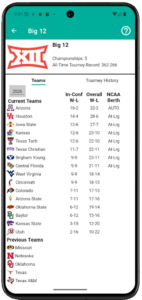
Big 12 Conference Standings

Anyway, use the Year Picker control to elevate a particular past season.  See the Help screen (tap upper right corner) for further usage information and limitations to our data set.

Conference Yearly Records

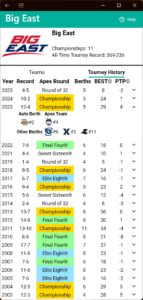
Bracket Master has been enhanced to provide more detail about a Conference’s yearly performance in the NCAA© Basketball Championship Tournament.  Previously the app displayed the conference team’s aggregate win-loss record in the tournament and the round of furthest advancement in the bracket.  We’ve added the total number of tournament berths received and our exclusive BEST© and PTP© scores that describe overall achievement and performance relative to expectations.

The Conference Teams Page is broken down into two tabs, Teams, which lists the active and previous member colleges, and Tournament History, which catalogs all the seasons the conference has sent a member into the tournament.

Tapping on a particular season will expand the row to show the team that received the conference’s automatic berth for winning the conference championship, the team (or teams, if tied) that advanced furthest in the tournament, and all the other teams that received tournament bids.  Tap on a team logo to navigate to their apex (latest) game in that year’s bracket.  The number next to a team’s logo is their seed number.  Seed numbers were not used in tournaments prior to 1979.  If the list of teams exceeds the width of the display, the list can be scrolled with a gesture.

Note that all Conferences have not always been awarded an automatic bid.  Additionally, our data source for auto berths only has this information back to 1991.  We will attempt to expand this information in the future.

See the app screen’s Help page (accessed via the question mark in the upper-right corner) if you have any questions about usage or terminology.  Details on the BEST and PTP calculations are can also be found there.

Team Schedules

Our first new feature of 2026 is complete game schedules for all Division 1 teams going back to 2010, including all past game results.  Also presented is a detailed categorization of game results by game type.

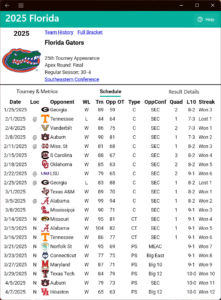
The Team-Season Page is broken down into three tabs, Tournament Results and Advanced Metrics (information that existed previously), Team Schedule, and Result Details.  Tap the tab headers to navigate between them.

Besides the score of games, the Team Schedule presents if a game is home, away, or on a neutral court, if the game is in-conference, non-conference, conference tournament, or post-season tournament, and the quadrant categorization of the team’s opponent.  Information may span off-screen to the right — scroll horizontally to see everything.

2025 Schedule of Florida Gators

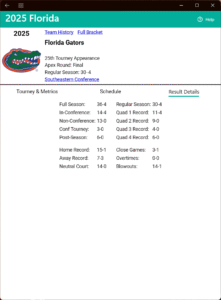
The Game Result Details tab breaks down a team’s season record by court location, opponent type, opponent quadrant, close games, overtimes, and blowouts.  Close Games are any games that finish within three points or less, or that went into overtime.  Blowouts are any games that finish with a margin of twenty points or more that did not go into overtime. A game that finishes in overtime with a twenty-point margin will count as Close but not as a Blowout.

Now that we have regular season game results in our data set, we are planning to add a game search utility similar to our existing tournament game search.

See the app screen’s Help page (accessed via the question mark in the upper-right corner) if you have any questions about usage or terminology.  Details on the Quadrant System game categorization are described there.


2025 Tournament Bracket Live

Update: Version 1.5.2 is now available from all app stores as of 1:57 PM EDT Monday, March 17.  It includes a statistics update for the Sunday games and a small new feature – the yearly records on the Conference-Teams Page are now color-coded for deep tournament runs.

The official 2025 men’s college basketball championship bracket is now available in the Bracket Master app as of 8:40 PM EDT Sunday, March 16.  This is downloadable as an ‘over-the-air’ database update to Bracket Master.  Download the new bracket by going to the app’s Settings Page and clicking on the ‘Check Now for Update’ button.  A full app update wil be coming in the next couple days from your app store to include statistics from today’s (Sunday’s) games.

Save Bracket As Image

Our first new feature of 2025 allows you to save entire brackets to your device for usage outside of the Bracket Master app. Create the best-looking tournament brackets anywhere!
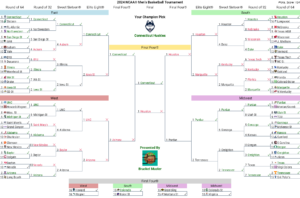
This functionality is provided from the Years tournament pages, the Picks page, and the Simulation page. Bracket images are saved as a standard ‘.png’ file and may be viewed using your pictures gallery, shared online, printed for examination in a larger format, or perhaps submitted to a bracket pool.

Tap on the Save Image ‘panorama image’ icon at the top right of the screen to
generate a picture of the entire bracket. When using this function from the Picks page, a bracket image will be generated showing your game selections with color-coding for correct and incorrect picks based on game results. The Years and Sim pages will show brackets displaying the score of official or simulated games, respectively.  Remember to Tap the Help ‘question mark’ icon for guidance on any of Bracket Masters pages.
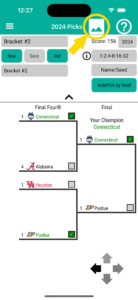


Tap the Save ‘floppy disk’ icon to save the bracket image to your device. The save location will default to the general user location of your device, though you can select a specific location using the save dialog. The image will be assigned a generated file name, though this may be changed using the save dialog, or from the Image Settings page (by tapping the gear icon). Use your device’s Files app to access the image after saving it. Using an Apple device, the bracket image won’t be accessible by the picture Gallery app unless you actively Share it to the pictures folder or an album using the Files app Share functions. Also use the Share function to text message or email the image. With an Android device, the bracket image will typically be automatically accessible by other apps, but if it isn’t the process is similar to that of Apple devices — use an Android file management app to Share the image with other apps or move it to another folder.
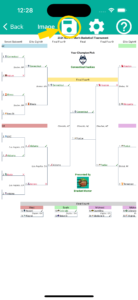
Tap the Settings ‘gear’ icon to modify the configuration of the image generation. The Image Settings page allows you to modify the bracket title line, the file name, and the optional appearance of logos, seed numbers, and game locations. See the Image Settings help page for more detail on these options.

Print your bracket image using ‘Landscape’ orientation and the ‘Shrink to Fit’ or ‘Scale to Fit’ option in your printer settings. Note that setting the display option for seed numbers and team logos to ‘All Rounds’ will cause the generated bracket to grow in width, so for tournaments with more than 32 teams the image will need to be scaled down to properly fit on a 8.5 x 11 inch or A4 piece of paper.

Tournament Update Schedule

Today, Thursday, March 14, 2024 at 12:50 EDT, we released the first ‘over-the-air’ database update to Bracket Master.  Download this by going to the app’s Settings Page and clicking on the ‘Check Now for Update’ button.  This updates the projected tournament bracket and includes team statistics for games through Wednesday.  As of this morning the following automatic qualifiers are now in the big dance: Stetson, Montana State, Longwood, College of Charleston, Oakland Michigan, Drake, Wagner, Morehead State, Colgate, Samford, McNeese State, and South Dakota State, James Madison, and Saint Mary’s.

Bracket Master will get another data update after the tournament selection show on Sunday night, followed by a full app update on Monday morning.

The Monday update will include a new feature: the ability to tag your favorite teams and have them appear at the top of the Teams front page listing.  Monday will also include the final regular season statistics and assorted functionality improvements.

As the tournament progresses, we plan to put out data updates the morning after the completion of each round.

Enjoy the tournament, everyone!  It should be a wild one.

Leap Day Major Update

Bracket Master is being updated today with its first functionality additions of the year. This release has been in the works since November and primarily comprises ‘under-the-hood’ improvements, but there are several new features included.

The app now includes several new well-regarded team rating metrics. Also, our exclusive Scrutinous Score has been refined and given more visibility in the app. We believe the enhanced Scrutinous Score and Scrutinous Game Odds have significantly improved our (already very successful) tournament game picks and simulation.

A Compare Teams function has been added to the top-level menu. This allows you to view side-by-side statistics of any two teams from any season. This feature was previously available through the Picks Page to contrast teams in a scheduled matchup, but this new option gives much more flexibility.

A Settings page has been added to the top-level menu. This allows you to set a Dark Theme or Light Theme display. Additionally, the ability to update the app’s data is provided. Clicking on the ‘Check for Data Update’ button will query the internet for a data file refresh. This is a database file provided by Scrutinous, so an update won’t always be available, but this function should allow us to deliver more frequent data refreshes to you. When an update is available via your app store, you likely will not be able to update using this option.

All of the team and conference logos have been refreshed and hopefully improved.  Some of the images don’t look great while using Dark Mode, so we’ll try to revise them over time.

This Bracket Master version 1.4.1 update is essentially a full re-write of the app. The new code base should improve performance, polish the app’s appearance, better support the delivery of new features, and sustain the app over the long term. Stay tuned for more big enhancements coming this year.

If you encounter a bug, please describe it on our Report a Bug forum. We welcome suggestions for new functionality on our Request a Feature forum.

The Cinderella Score: PTP

Bracket Master’s latest new feature is the Performance Page.  This page allows you to examine the tournament performance of Teams and Conferences compared to expectations.  The exclusive PTP© score presented here evaluates tournament advancement relative to the designated seed number.  PTP© is an initialism of Performance to Par.

PTP defines a seed’s expected performance par by assuming that the higher seed should always win, i.e., game results are determined by ‘chalk’.  If one works through a bracket picking the higher seed in every game, the following results unfold:

  • 1 seeds are meant to reach the Final Four
  • 2 seeds are presumed to reach the Elite Eight
  • 3s & 4s should make the Sweet Sixteen
  • 4s through 8s should win one game into the Round of 32
  • 9s through 16 aren’t expected to win a game.

PTP assigns a score based on these expectations.  For each game a team advances past their seed number’s expected round the team earns one point; each round the team fall short they lose one point.  For example, in 2022 the championship Kansas team (#1 seed) earned two points for winning two games beyond reaching the Final Four.  Saint Peter’s (#15 seed) earned a +3 for winning three games; their first round opponent, Kentucky (#2 seed), gets a -3 for not making their forecasted Elite Eight.

Accumulating a large positive score is challenging for high-major teams that consistently receive top seed bids because of how hard it is to advance deep in the tournament.  To help account for this, we display the Average Seed of each team alongside their PTP.  A lower (better) Avg Seed means the team was anticipated to win multiple games.  A positive PTP score over time with a low Average Seed is particularly impressive.

The challenge for highly seeded teams is contrasted by mid-major Cinderellas such as the Loyola Ramblers.  Their 2018 run as an eleven seed banked themselves +4 PTP.

We feel that the PTP listing of Conferences is particularly useful.  It lessens the bias of small sample sizes to illuminate the leagues that produce title contenders and dark horses, and those that have perhaps become over-rated for a span.

The PTP score helps to remind of the biggest shocks in tournament history, such as DePaul’s collapses as a #1 seed from 1980 to 1984, and Butler’s run to the finals in 2010 and 2011.  The DePaul years are described in the following article: The Bonus: March 14, 1981: When the NCAA tournament became Madness – Sports Illustrated.  Butler is said to be the smallest university to play in the championship game since the 1985 64-team field.  Their 2010 tournament is detailed here: Butler’s incredible 2010 NCAA run, remembered by Coach K, Tom Izzo, Frank Martin and Jim Boeheim | NCAA.com

The Performance Page featuring the PTP score is part of the BracketMaster 1.3.6 release of February 27, 2023.